> For the complete documentation index, see [llms.txt](https://support.sayprimer.com/primer/llms.txt). Markdown versions of documentation pages are available by appending `.md` to page URLs; this page is available as [Markdown](https://support.sayprimer.com/primer/connections/setting-up-crm/salesforce-integration/connecting-salesforce.md).
# Connecting Salesforce
Integrating Salesforce with Primer allows you to leverage your Salesforce objects (like Contacts and Accounts) to create more precise and targeted audiences.
{% hint style="info" %}
Salesforce integration is **READ-ONLY**
{% endhint %}
#### Read Data from Salesforce
**Step 1.** Go to the “Connections” tab from the navigation and tap on the **Salesforce icon** in the Integrations section.
**Step 2.** Log into your Salesforce instance. Please make sure you have access to set-up an API integration. User should have access to read Lead, Contact, and Account Objects. Access to Campaigns for bulk Campaign import and access to Opportunities for conversion tracking is also recommended.
**Step 3.** Select your Salesforce Account to connect to Primer
**Step 4.** Confirm that your Salesforce instance is now connected to Primer.
**Step 5:** Primer will start importing and processing your records. [Learn more here](https://support.sayprimer.com/primer/integrations/connecting-salesforce-to-primer/salesforce-data-ingestion).
{% hint style="info" %}
**Ingestion Rate: 400,000 records per hour.**\
Example: 100K accounts + 300K contacts + 300K leads + 50K opportunities + 10K campaigns + 40K campaign members = 800K records = 2 hours to ingest
{% endhint %}
**After Initial Sync:** Once the initial ingestion completes, Primer switches to incremental syncs — typically processed within 10–15 minutes.
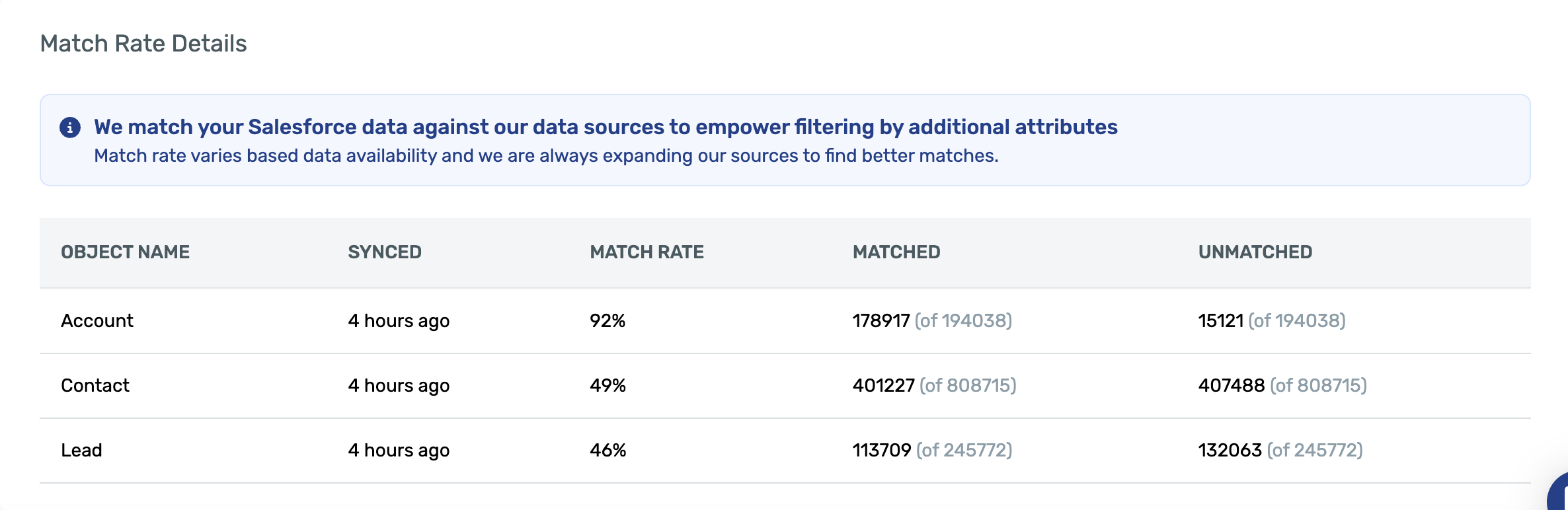
When importing records from Salesforce into Primer, we need to match your Salesforce records to our Primer database to ensure a consistent match rate to ad platforms.\
\
The "object match rate" refers to our ability to confidently match an account, contact, or lead object to an existing record in our repository. Because we "pre-match" Salesforce to our database, whenever you build an audience in Primer, that audience is much more likely to achieve a good match rate in ad platforms like Google, Meta, and LinkedIn.
**Which fields drive matching:** For Salesforce Accounts, Primer matches primarily on the standard **Website** field. If that field is blank, Primer falls back to other fields likely to contain website/domain data. If you use a custom field (e.g., a "Primary Domain for Matching" field) and want Primer to use that instead, reach out to [Primer Support](mailto:support@sayprimer.com).
**Why "View Setup and Configuration" is required:** Primer needs read-only access to your org's metadata (object structure, fields, and configurations) to properly discover and map objects like Accounts, Contacts, and Leads. Without it, Salesforce blocks the API calls Primer's integration relies on.
**Step 6:** Use Salesforce filters when building your audiences. [Learn more here](https://support.sayprimer.com/primer/building-audiences/how-to-build-an-audience/salesforce-filter-criter).
{% hint style="info" %}
If you're using a standard Salesforce field, it will load quickly right from the start since it's a first-class field. For custom Salesforce fields, the initial estimation might take longer the first time you use it. However, once it's used, we'll mark it as a first-class field, ensuring it loads very quickly in future uses.
{% endhint %}
---
# Agent Instructions
This documentation is published with GitBook. GitBook is the documentation platform designed so that both humans and AI agents can read, navigate, and reason over technical content effectively. Learn more at gitbook.com.
## Querying This Documentation
If you need additional information that is not directly available in this page, you can query the documentation dynamically by asking a question.
Perform an HTTP GET request on the current page URL with the `ask` query parameter, and the optional `goal` query parameter:
```
GET https://support.sayprimer.com/primer/connections/setting-up-crm/salesforce-integration/connecting-salesforce.md?ask=&goal=
```
`ask` is the immediate question: it should be specific, self-contained, and written in natural language.
`goal` is optional and describes the broader end goal you are ultimately trying to accomplish on behalf of the user. GitBook uses it to tailor the answer towards what is most useful for that goal.
The response will contain a direct answer to the question and relevant excerpts and sources from the documentation.
Use this mechanism when the answer is not explicitly present in the current page, you need clarification or additional context, or you want to retrieve related documentation sections.