> For the complete documentation index, see [llms.txt](https://support.sayprimer.com/primer/llms.txt). Markdown versions of documentation pages are available by appending `.md` to page URLs; this page is available as [Markdown](https://support.sayprimer.com/primer/build-and-manage-audiences/building-an-audience/adding-filters/website-activity-filters.md).
# Website Activity Filters
In addition to standard firmographic/demographic filters, you can also segment audiences based on their interactions with your website.
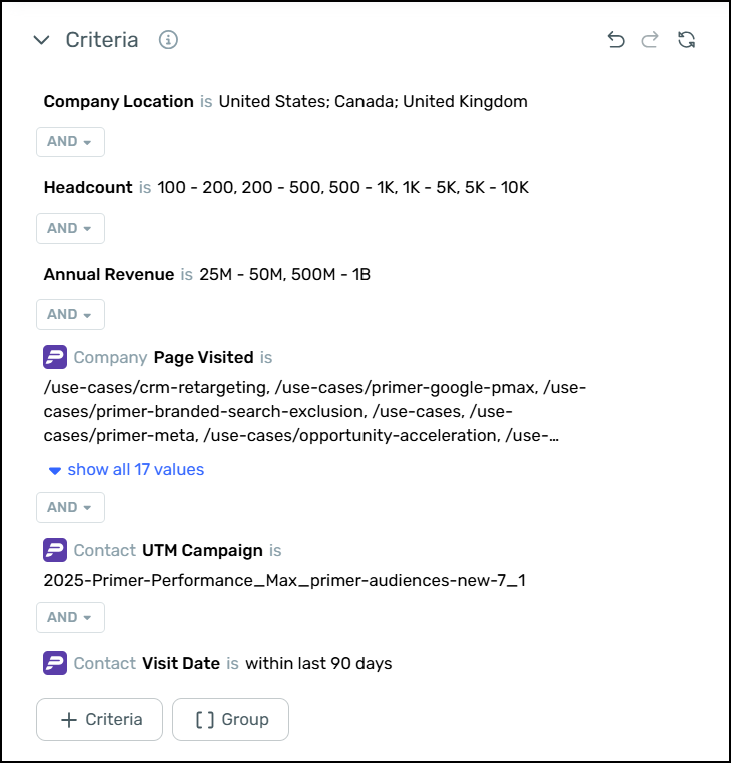
#### Using Website Reveal Filters
You can use Website Reveal data in your filters to create audiences of de-anonymized visitors. (More info [here](/primer/intro-to-website-reveal.md))
Here are a few examples:
* **Retarget identified U.S. contacts:** Reach out to contacts we’ve de-anonymized from U.S. website visits.
* **Retarget identified companies (worldwide):** Build campaigns for companies visiting your site, even if their visitors remain anonymous.
* **Filter by traffic source:** Target visitors based on UTM tags or referring pages — helpful for analyzing high-traffic sources or campaigns.
* **Combine with CRM filters:** Exclude existing customers or open opportunities to focus on new prospects.
**Example play:**
Retarget visitors who viewed your pricing or documentation pages but aren’t yet in Salesforce as customers or opportunities.
Website Reveal filters update automatically as new visitors are identified, so your audiences stay fresh without manual effort.
#### Using Form Filters
You can also build retargeting audiences based on people who've filled out forms on your website. You can filter by:
* **Form Name**\
Filter records by the specific name of the form that was submitted on your website (e.g., “Demo Request”, “Contact Us”).
* Available for: **Company** and **Contact**
* **Form Submits**\
Filter records based on when a form was submitted.
* Available for: **Company** and **Contact**
These filters help you build audiences based on real-time form engagement.
---
# Agent Instructions
This documentation is published with GitBook. GitBook is the documentation platform designed so that both humans and AI agents can read, navigate, and reason over technical content effectively. Learn more at gitbook.com.
## Querying This Documentation
If you need additional information that is not directly available in this page, you can query the documentation dynamically by asking a question.
Perform an HTTP GET request on the current page URL with the `ask` query parameter, and the optional `goal` query parameter:
```
GET https://support.sayprimer.com/primer/build-and-manage-audiences/building-an-audience/adding-filters/website-activity-filters.md?ask=&goal=
```
`ask` is the immediate question: it should be specific, self-contained, and written in natural language.
`goal` is optional and describes the broader end goal you are ultimately trying to accomplish on behalf of the user. GitBook uses it to tailor the answer towards what is most useful for that goal.
The response will contain a direct answer to the question and relevant excerpts and sources from the documentation.
Use this mechanism when the answer is not explicitly present in the current page, you need clarification or additional context, or you want to retrieve related documentation sections.